Skip to content

Magic Moments

Bible inspiration and some little notes

  • Home
  • Note
  • Photography
    • Bible Inspiration
    • Magic Moments Photography Subscription

Category: Technical Sharing

A stupid alternative to run macros on iOS
Technical Sharing

A stupid alternative to run macros on iOS

2018-02-14 Surfing FishLeave a comment

I’m an Apple Fan such that I’d obsoleted my laptop and jumped into iPAD world. However, MS Excel iOS version only provides popular function. Some functions are not provided in iOS version of MS Excel with different reasons, such as running macros, creating pivot tables….etc. Here’s my trick to enjoy the iPAD’s benefits without sacrificing Windows’s enjoyment.

In simply, I connect to a Window Platform via Remote Desktop. If you still have a physical laptop, you can simply connect to your physical laptop via Remote Desktop. But I’ve obsoleted laptop, so my trick is to create a cloud server and connect to it!! The advantage of cloud server over physical laptop is that you can start the server up whenever you want to reduce the risk of anonymous attempts of connection.

Here’s the steps:

1. Create account in cloud server provider

There’s 2 major cloud server providers: Microsoft Azure and Amazon Web Services. Both are provided the free tier cloud server for trial. The benefit of cloud server is that you can upgrade or downgrade the capacity of the cloud server whenever you want. In my cases, the cloud server is being used as a PC or laptop. Hence, the free tier capacity is sufficient for the usage.

2. Create Keypair for the cloud server

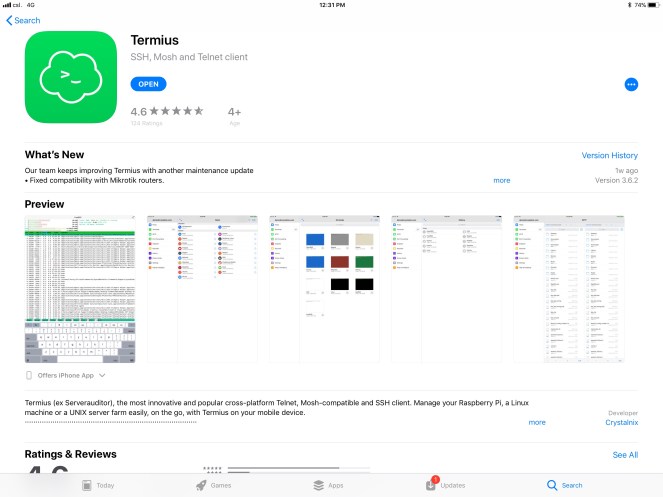
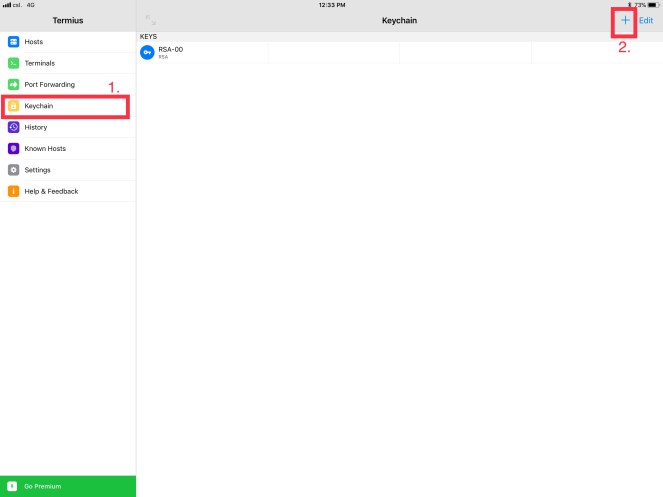
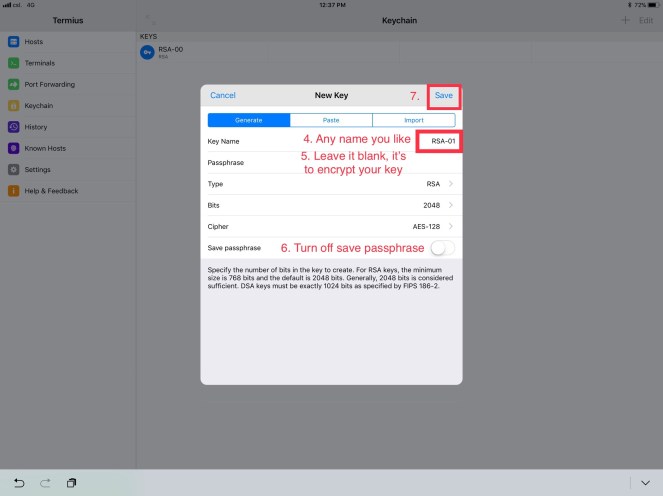
In order to strengthen the security of the cloud server, a typical authentication of public and private key is used. The cloud server provider is supported to generate the key pair in their site, but it doesn’t support to download to iOS. Hence, you need tools to generate the key pair on your own and import into the cloud server provider’s platform. Termius is my choice.

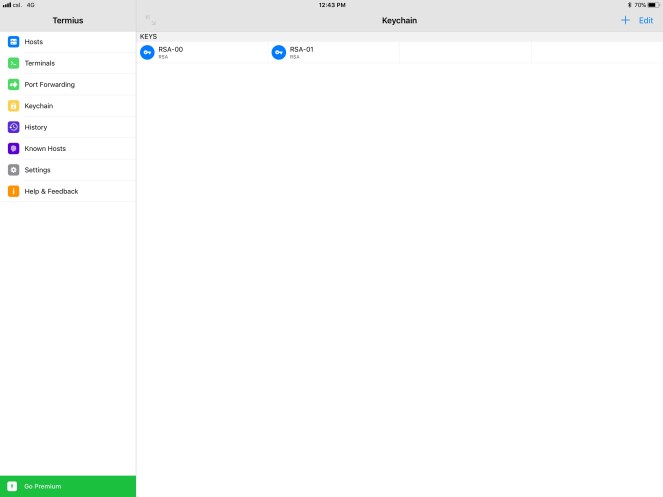
Now, your keypair has been created in IPAD now. The next step is to import into Cloud Server Provider’s Platform with the public key.

3. Create Instance in Cloud Server Provider

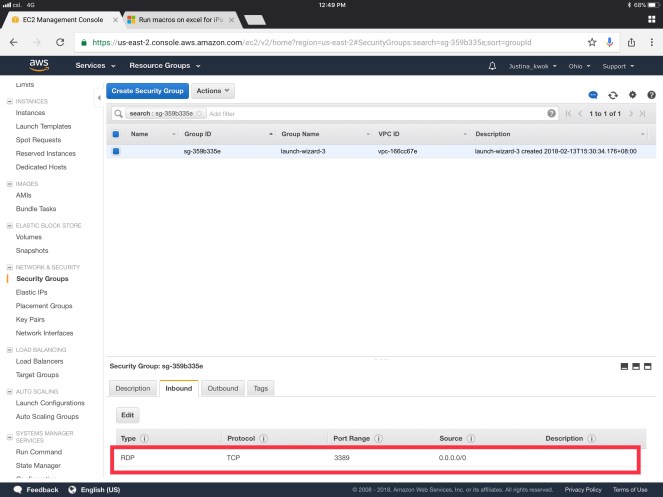
Pls follow the default setting to create the instance except to allow the Remote Desktop connection in the security group setting.

4. Getting window password for the instance

In order to generate the admin password in the cloud server provider, it requires the private key generated in previous steps. Hence, it’s important that your private key has not been encrypted. Simply copy it and paste in the generator.

5. Starting your instance

6. Remote connect the cloud server on iPAD

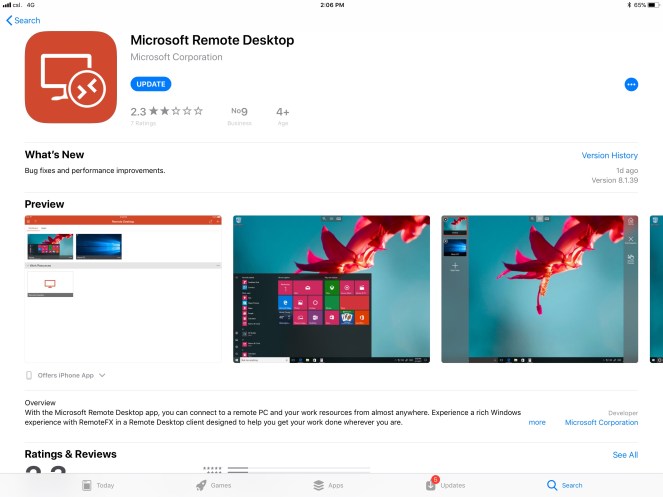
My choice of Remote Desktop app is Microsoft one.

After you connect to a Cloud window server, you can download any applications that you like.

Technical Sharing

How to survive among changes?

2016-11-21 Surfing FishLeave a comment

One of my daily tasks is to align the expectation from user with the system.  In simply, I checked the code and tell the user what the system is doing.  In many case, it can be settled with knowing what the system behaves.  In others, user may trigger change request to improve the system.  

That’s my favourite task.  Coz’ I can then know how the user uses the system to handle their daily task.  Sometimes, I can dig some stories behind the scenes.  Sometimes politics Sometimes humanities.  And then it becomes the system history.  

My job is to keep the system clean and running across the changes.  These changes can be a technical change, a business change or even a political change.

The typical example of technical change nowadays is the upgrade of all users PC to Window 7.  Since the architecture evolves greatly in Window 7, all client programs need to upgrade.  The impact is IT department needs to upgrade all the systems accordingly.  With this chance, system reviews is a must…… (this’s sure a disaster coz’ you need to dig out all procedures).

To survive among the changes, managing the user expectations is the key.  These includes many soft skills such as listening, effective communication and cognitive impact to the user for your proposal.

Technical Sharing

Security beyond 2 factor authentication when using outlook.com

2016-11-18 Surfing FishLeave a comment

In many critical IT System, the production account is well protected.  They will only be created on demand and even the username will be a password like string to avoid potential guessing.

How to increase the security even when you use public email system like outlook.com?  For sure, enabling 2 factor authentication is the basic.  But what can we do more to protect our account?  

I suggest to protect our login name by creating email alias in Outlook.com.

With email alias, you can have more than one emails in outlook.com in 1 email account.   The  benefit is that you can separate your login name and daily email.  Hence, the others won’t have your login name.  But of coz’ you won’t give your login email to anybodies.

Here’s the steps to separate your login email and daily emails.

1. Create email alias in Outlook.com.  

Eg your present login is a@outlook.com, you now create b@outlook.com.  I assumed you had given a@outlook.com to your friends and other online systems.  You now create b@outlook.com as your new login email.  Pls don’t give b@outlook.com to others.

https://support.office.com/en-us/article/Add-or-remove-an-email-alias-in-Outlook-com-459b1989-356d-40fa-a689-8f285b13f1f2 

2.Manage which alias as login 

You now make b@outlook.com as your login email by following below steps.

 https://support.microsoft.com/en-us/help/12407  

3.Manage which alias as primary 

The you change b@outlook.com as your primary account.

 https://support.microsoft.com/en-us/help/12407 

4. Change your default send from email 

Finally, you change your default send from email to a@outlook.com so that system will send all emails from a@outlook.com even when you send email in mobile.

http://www.thewindowsclub.com/create-add-use-outlook-email-alias  

Now, you can add b@outlook.com in your mobile as your login!!

Technical Sharing

Installing Oracle SQL Developer in Win 7 to a Oracle 9i Database

2016-11-162016-11-16 Surfing Fish1 Comment

Steps:

  1. extract Oracle instant client to C:\instantClient
  2. extract Oracle SQL Developer to C:\SQLDeveloper
  3. copy tnsnames.ora to  C:\instantClient
  4. launch Oracle SQL Developer
  5. goto Tools>Preferences
  6. goto Database>Advanced
  7. change Tnsnames Directory to C:\instantClient
  8. check Use Oracle Client
  9. click Configure…
  10. change client Type to Instant Client
  11. Change Client Location to C:\instantClient
  12. Click OK (Don’t Click Test, the library hasnt yet loaded.  the test result will be failed.)
  13. Oracle SQL Developer will restart
  14. goto Tools>Features
  15. uncheck all optional features to increase the start runtime except Database>Oracle SQL Developer – SSH Support
  16. Click Apply Changes
  17. Click OK
  18. Oracle SQL Developer will restart
  19. Add Connections
  20. Fill in Connection Name, Username and Password
  21. Change Connection Type to TNS
  22. Select Network Alias
  23. Click Save and Connect

Related Links:

http://www.oracle.com/technetwork/topics/winx64soft-089540.html

http://www.oracle.com/technetwork/developer-tools/sql-developer/downloads/index-098778.html


Technical Sharing

Internet of Things

2016-11-152016-11-15 Surfing FishLeave a comment

In 1865, International Telecommunication Union[1] (ITU) was formed at the International Telegraph Convention to coordinate the shared use of the radio spectrum.  Now ITU is the United Nations specialized agency in the field of telecommunications, information and communication technologies (ICTs). The ITU Telecommunication Standardization Sector (ITU-T) is a permanent organ of ITU.

Expertizes from all around the globe was involved in the standardization requirements to the Internet of Things technologies.  Every concern raised by the commenters will be discussed while the common concern will be the privacy and the risk for all things to be connected to the Internet.

What’s Internet of Things?  According to the recommendation Y.2060 Overview of the Internet of things raised by ITU-T at June, 2012[2], the Internet of things is a global infrastructure for the information society, enabling advanced services by interconnecting (physical and virtual) things based on existing and evolving interoperable information and communication technologies.

In 10 June, 2015, ITU-T established a new study group SG20 to address the standardization requirements of Internet of Things technologies.

Hence, things that can be interconnected to the Internet is called the Internet of things. These things can be phone, watch, light bulbs, TV, refrigerator, car, traffic light, and even rubbish bins, etc.  The implication for the things to be connected to the Internet is that we are exchanging information instantly and around the globe.

For example, you can watch the latest episode around the globe with the smart TV instantly.  Hence, the message of the episode is delivering to the globe instead of selected countries.  The economic value is multiplied in exponential.

Another example is order can be made via the Internet when you notice your refrigerator is empty.  The supermarket will deliver your order to your home upon receiving your order.  The manufacturer will then manufacture the products upon receiving orders from supermarkets.  With the streamline from your order to the manufacturer, the number of stocks in the warehouse is then minimized.  The food that is expired in the warehouse is then greatly reduced.

A more future example is the cars could be communicated itself with the help of the machine to machine communication.  When 2 smart cars were crashing each other accidentally, the smart cars could be communicated itself and stopped the incident without the human interaction.  Together with the help of the smart traffic light, when the smart traffic light was notified about the incident by receiving the crashing report from the crashing smart cars, it could then trigger a preventive action plan such as changing the traffic light to prevent further crashing and communicate with the other on the path’s smart cars.

Common Concern of IoT

The privacy issue and the risk of being interconnected with things can be viewed as eco-system in the information society while this eco system is still under development.

For example, we can all beneficial from the smart car and the smart transport system to reduce the accident rate.  However, what if someone hacks into the smart transport system, and triggers an accident targeting a person?

With this example, I’ll view in this way, A triggered an accident to B.  A was committing crime and this crime is the same as you are driving a car and crashing to B.  Hence, the story goes with A is going to be charged of murder with evidence.  However, in real accidents in many countries A cannot be traced and hence A is not charged.

As a result, IoT suggests things needs to be identified in the information society.  With the identity, smart car A and B has identity in the information society.  When there’s accident, the smart traffic light will record the incident with smart car A and B.  And the regulatory will investigate case by case.

Ideally, if A has ethnics that A understand the consequence of committing crime, such as it leaves bad record that would affect A’s whole life, and hence A rejected to commit crime at first place.  Then all the identity in the information society became a preventive measure since all activities in the information society is traceable, even if you try to read a record, it will be logged.

From ancient time, human introduce ethnics to regulate the interaction between humans.  For example, most of the ancient people didn’t know the reason why the son cannot marry with his mum.  But ethnics told most of the ancient people this was not acceptable and hence this was forbidden.  As a result, the human being can remain at the top of the food chain.

Hence, can we develop Internet ethnics in this era?  With the education, most of the people nowadays know the reason behind the ethnics and has its decision to follow the ethnics or not.  However, not every introduced ethnics is sensible.  Some of them may be introduced for the sake of the rulers.  Thus, a little group of the people would wonder the ethnics and even challenge with the rulers.  How to solve these challenge will be the rulers’ top priority nowadays.

So as to evaluating every ethnics, education is a must and the Internet is the platform for storing our treasury – our knowledge and for discussing the ethnics introduced by the rulers.  Only sensible ethnics can then be remained in the flow of the time.  Hence, the Internet that is open and public is the foundation for our ongoing evolution.

According to the ICT figure released by ITU at 26 May, 2015[3], 3.2 billion people are using the Internet globally.  Internet penetration is 43% of the global population, of which the internet penetration in the developed countries is 82.2%, 35.3% in the developing countries and 9.5% in the least developed countries (LDCs).

Hence, half of the people in the world access to the Internet.  With the Internet, you can have free university education[4] and a connection to the globe platform.  According to the figure of the internet penetration, you can summarize as a result of the imbalance of the resource allocation.  9.5% in the least developed countries of the Internet penetration can mean the people there have so little resource that they cannot afford to access to the Internet.  In fact, they can’t even support their life.

This imbalance of the resource allocation can lead to wars in the future especially when there is a shortage of resource.  Hence, United Nation was set up 70 years ago to coordinate this kind of resource balancing.  Energy is the key for solving the problem.  A clean and recycling energy is our future.

For the concern about the risk of being connected with things, I viewed the concern of being connected with things is the concern of unauthorized access to the data.

Every message in the Internet Era has access level.  Different people has different access right to the message.  For example, you can share a particular message to your Facebook friends only.  In more serious case, an email can be restricted to the government internal discussion.  However, some messages like news is opened to all.

When someone wants to breach his access right (well, it’s common for people to gather all information that he can grep and it’s a common trick for boss to leak the so called confidential information to these people.) , it’s the same no matter the information is Online or Offline.

The cognition of the message is more important than the spread of message.  I noticed that many people has its own idea opposite to the main media.  For example, in the press release of the MTR’s stock holder meeting, many people showed up and spoke for their point of view contrasting to the vote result.  Does the media represent your point of view?

The importance of education is to develop children’s knowledge and the analytic skill to these knowledge.  With the Internet, you will get your support easily.  I believe innovation will be grown exponentially in the Internet era.  Since the Internet can automate many things, I won’t be surprised if 90% of the global population is researcher in the future and the meaning of living will no longer being satisfied with physical demands such as eating or breathing.

[1] https://en.wikipedia.org/wiki/International_Telecommunication_Union

[2] http://www.itu.int/rec/T-REC-Y.2060-201206-I

[3] http://www.itu.int/net/pressoffice/press_releases/2015/17.aspx#.VfY019Kqqko

[4] https://www.coursera.org/

https://lagunita.stanford.edu/

Technical Sharing

Installing Oracle Client for Window 7 to Oracle 9i Database

2016-11-152016-11-15 Surfing FishLeave a comment

I’m using 64bit Window 7 for developing applications for Oracle 9i.  These includes development in SQL Developer, MS SQL Server DTS and MS Access 2007.  MS Access 2007 may specially require connection using odbcad32.exe (ODBC 32 bit, located in C:\Windows\SysWOW64 )

High Level Steps:

  1. install 64bit Oracle 11gR2 client in Oracle Home 1 => for connection to SQL Developer and MS SQL Server DTS http://www.oracle.com/technetwork/database/enterprise-edition/downloads/112010-win64soft-094461.html
  2. install 32bit Oracle 11gR2 ODAC in Oracle Home 2 => for connection to Access 2007 or older technology http://www.oracle.com/technetwork/database/windows/downloads/utilsoft-087491.html

Related Links:

https://blogs.msdn.microsoft.com/dataaccesstechnologies/2010/01/26/connectivity-issue-with-oracle-in-x64-environment-ora-12154-tnscould-not-resolve-the-connect-identifier-specified/

https://oracle-base.com/articles/misc/manual-oracle-uninstall

http://superuser.com/questions/713258/how-to-remove-odbc-data-source-if-driver-is-removed


  • Home
  • Note
  • Photography

Enter your email to follow this website, and the new passage will send to your email.

Buy Me A Coffee
Website Built with WordPress.com.
  • Subscribe Subscribed
    • Magic Moments
    • Already have a WordPress.com account? Log in now.
    • Magic Moments
    • Subscribe Subscribed
    • Sign up
    • Log in
    • Report this content
    • View site in Reader
    • Manage subscriptions
    • Collapse this bar
 

Loading Comments...